
Like most teams, we depend on a long list of things we did not write ourselves: frameworks, libraries, database images, Terraform providers, CI actions. All of them release regularly, and all of them occasionally release something that we really should not miss.
For a long time, we had no system for this. Some team members were subscribed to individual GitHub repositories, others followed newsletters, and others simply checked the changelog whenever they were about to update something. It worked, in the sense that nothing caught fire. But it did not work well.
The main problem was coordination. Information lived in individual inboxes, so whenever something relevant came up it turned into a back and forth of links and threads before everybody was on the same page. The second problem was security. Security-relevant releases tend to be a single line inside a wall of other changes, and unless a release was severe enough to make the rounds on its own, there was a good chance we would find out about it late.
This became especially apparent as our infrastructure team grew. More people, more services, more things to keep track of. So we concluded that we needed a better way to coordinate this, and started looking for a solution.
Why not Dependabot or Renovate?
Before looking at notification tools at all, we tried the more obvious route: automated update bots. Dependabot and Renovate open pull requests whenever a dependency publishes a new version, so in theory nobody has to watch releases at all.
In practice, this did not fit how we work. These bots operate per repository and mostly one dependency at a time, which turns every routine release into a steady stream of pull requests. Most of these were bug fix bumps. Not irrelevant, exactly, but not worth an individual pull request each, and certainly not worth the same pull request appearing in every project that used the dependency, judged independently by whoever happened to be assigned. The same small release ended up being assessed several times over, by several people, in several places.
The issue was never being told about small releases. It was the form they arrived in: action items scattered across repositories instead of information collected in one place, judged once, discussed once, visible to everyone. That is a notification problem, not an update problem, and it is what sent us looking for a platform first.
Finding the right platform
The first question was not "which tool", but "where". We wanted a place where everybody gets notified, and where the update itself and the discussion around it live next to each other.
We landed on Slack fairly quickly. It is where the company already communicates, so this would not add yet another place to check. Threads keep discussions attached to the thing being discussed, and sharing a message with someone else takes two clicks. So Slack was the platform. What we still needed was a way to get the releases in there, because doing it manually was never an option.
Attempt 1: The native GitHub app
Slack has an official GitHub app, and it can subscribe a channel to releases. On paper, exactly what we wanted.
In practice, it had three problems. First, it notifies you the moment something is released. That sounds like the point, but a channel that pings you at random times throughout the week gets muted very quickly, and a muted channel is worse than no channel at all. Second, the message shows you what the release contains, but not what we needed to know about it. Nothing in it tells you whether this is a routine version bump or something security-relevant that should move to the top of your list, so every message still had to be opened and judged by hand.
The biggest issue, though, was coverage. The integration has to be enabled on the repository side, and a number of the third-party repositories we care about simply have not enabled it. Asking maintainers to turn it on for us was not a sustainable strategy.
Attempt 2: The Feeds app
With the GitHub app out, we tried another native Slack integration: the Feeds app, which subscribes to RSS and Atom feeds. GitHub exposes releases as a feed, so coverage was suddenly no longer the blocker.
The noise, however, got worse. Every change to a release produced a new notification, so editing a description after publishing was enough to trigger another message. Formatting was essentially non-existent. And, like the GitHub app, it happily notified us about pre-releases, release candidates, alphas and betas, which are exactly the releases we do not want to hear about.
We could have gone looking for better feed sources, but that would have meant maintaining a curated list of reliable feeds forever, which is its own kind of work.
Attempt 3: Third-party apps
Once it was clear the native integrations would not get us there, we looked at third-party apps. A few came close, but none of them combined the things we actually needed: quiet by default, loud for security, and not dependent on repository owners enabling anything.
So we decided to build our own: small, tailored to how we work, and extendable when our needs change.
Our release monitor bot
The result is Release Monitor, a Slack bot that watches repositories and posts releases into the channels that care about them.
It is configured from the channel itself with slash commands, so subscribing is a one-liner and does not require anyone to touch a config file or open a pull request:
/releases add github owner/repo
Subscriptions are scoped per channel. Frontend notifications do not end up mixed with backend or infrastructure ones, and every channel manages its own list independently. That has a second benefit which was not obvious to us at first: project teams can add the bot to their own project channel and track the dependencies specific to that project, public or internal, without pushing any of that into the company-wide channels.
For those company-wide channels, we settled on three: releases-backend, releases-frontend and releases-infrastructure. As the names suggest, these are the central place for the common dependencies the whole company relies on, split by discipline so everybody can join the ones that are actually relevant to them.
Periodic digests
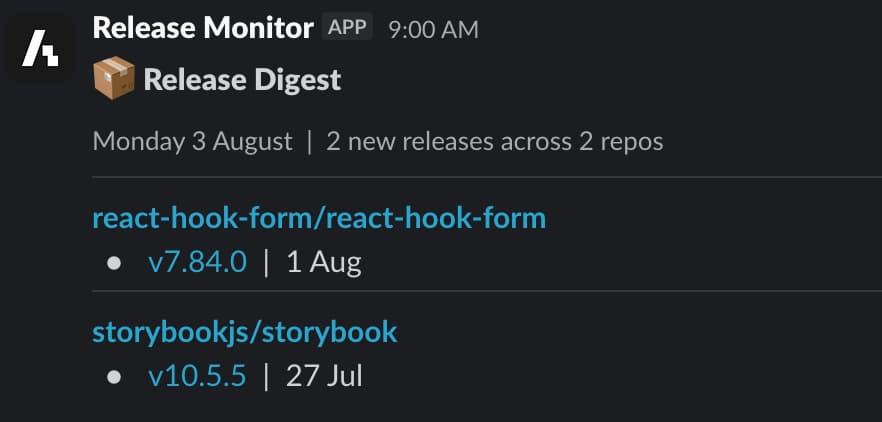
The lesson from our earlier attempts was that timing matters more than we expected. One notification on Monday at 10:00 and the next on Wednesday at 15:00 is how a channel becomes background noise.
So the default notification mode is a digest. Releases within a configured timeframe, a week in our case, are collected and posted as a single summary on Monday morning. One message, one moment in the week where you look at what changed. And, as promised, pre-releases, release candidates, alphas and betas are filtered out. Everything in the digest is a proper, stable release.
Not everything fits a weekly rhythm, though, so a subscription can also be set to immediately. It skips the aggregation and posts every stable release as soon as it is discovered. We mainly use this as a convenience for our own internal packages, where a team usually wants to know about a new version right away rather than next Monday. The third mode, security-only, is for repositories you do not want to follow release by release: no digest entry, no notification for ordinary releases, only the security ones.
Security releases
A weekly rhythm is fine for a minor version bump. It is not fine for a vulnerability.
That is why security releases bypass the hold-back entirely. When a release contains markers that suggest it is security-relevant, such as a referenced CVE or GHSA advisory or a mention of a vulnerability, it gets a security score. If that score crosses a threshold, the release is posted right away, together with the reasons why it was flagged.
This is not something you opt into. Security alerts are on for every subscription, whatever its notification mode. A channel on the weekly digest still gets pinged the moment one of its repositories publishes a security release, and so does a channel set to immediately. The mode decides how you hear about ordinary releases; it never decides whether you hear about security ones.
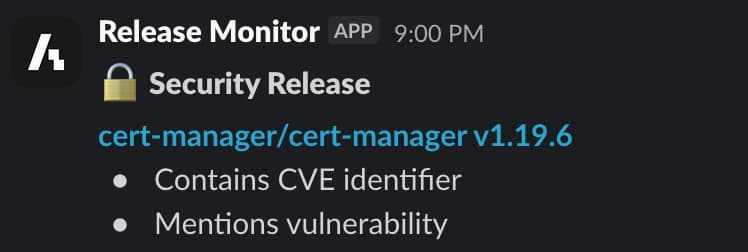
One detail that is easy to miss: once a release has gone out as a security alert, it is no longer part of the next digest. You are told about it once, at the moment it matters, and it does not show up again on Monday as if it were news. The digest stays a summary of what you have not already seen.
Keeping the message small
You will notice from both screenshots that the messages are deliberately sparse: the repository, the version tag, and for security releases the markers that triggered the alert.
This is by design. Release descriptions change after publication, so copying them into Slack means showing something that may no longer be accurate. And a wall of text is exactly what makes a channel hard to scan. The message answers "does this concern me?", and the link answers everything else.
Behind the scenes
The bot is written in TypeScript on top of the official Slack Bolt SDK, which means everybody on our team can work on it without learning a new stack first.
For the runtime, we chose Bun. The reason was pragmatic: nearly everything we needed was already in the box. Cron scheduling, a PostgreSQL driver, native TypeScript execution, .env file handling, a test runner, all built in, with no additional dependencies to pick, wire up and keep updated. For a small internal service, that removes a surprising amount of setup and maintenance.
And since Bun is largely compatible with the Node.js API, the ecosystem we already rely on kept working. The Slack SDK, our tooling and our linting setup all behaved as expected.
Conclusion
The change we noticed most was not technical. It was that "did you see that release?" stopped being a question anyone had to ask. Updates arrive in a predictable place at a predictable time, discussions happen in the thread right below them, and security releases interrupt us on purpose rather than by accident.
None of this required a large system. It required a small one that makes the right decisions about what to show, when to show it, and what to leave out.
Release Monitor is open source and available on GitHub, including a full setup guide. It currently supports GitHub as a source, and the internals are structured so that other sources can be added later. If you have any questions or feedback, feel free to reach out to us at info@aboutbits.it